Home Quizzes School Primary school Grade 4 Digital etiquette Grade 4 · Computing
Computing quiz for grade 4: Digital etiquette This quiz helps revise “Digital etiquette” in Computing for grade 4. It has 25 questions in five categories: Kind Chat, Before You Post, Clear Email, Video Class, Working Together. Questions get harder as the points go up, from 100 to 500.
Play↗
A peek at the questions The 100- and 200-point questions are open here. The rest show only their first words, and there are no answers: all of that is in the game itself.
Kind Chat 100 What word makes a request in a class chat more polite?
200 One person keeps sending the same thing in this picture. What is this called?
300 You sent a harsh…
400 When you disagree in…
500 A spoken joke carries…
Before You Post 100 The child in the picture wants to post a photo with a friend. What should the child get from that friend first?
200 Which right of a friend do you ignore if you show their personal messages to others without asking?
300 What detail about a…
400 A friend sends you…
500 What do we call…
Clear Email 100 What does this symbol beside an email tell you is included?
200 Which line of an email briefly tells the reader what it is about?
300 What should you check…
400 What should you add…
500 A teacher emails the…
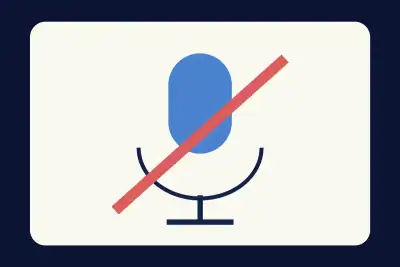
Video Class 100 Which device is switched off in this picture so it does not disturb the class?
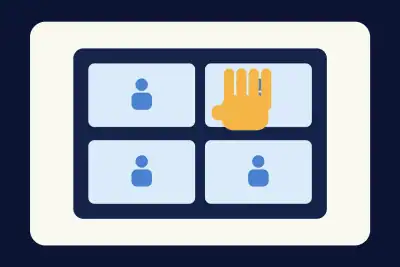
200 What did the pupil in the picture do to ask to speak without interrupting?
300 What do we call…
400 A classmate speaks slowly…
500 A pupil cannot hear…
Working Together 100 Which tool in a shared document is shown by the gold speech bubble?
200 What should you include beside someone else's drawing in a shared presentation?
300 You used a fact…
400 What do we call…
500 What do we call…
Play this quiz All 25 questions and the answers are in the game. Invite your class or friends with a link — guests need no account.
Play↗
How it works Pick a quiz and press “Play”. Send students or friends the link — they join from a phone or a computer. Choose questions on the board, buzz in first and collect points.