Home Quizzes School Primary school Grade 4 First coding with Scratch Grade 4 · Computing
Computing quiz for grade 4: First coding with Scratch This quiz helps revise “First coding with Scratch” in Computing for grade 4. It has 25 questions in five categories: In the Editor, When It Runs, Make It Move, Bring It to Life, Build the Logic. Questions get harder as the points go up, from 100 to 500.
Play↗
A peek at the questions The 100- and 200-point questions are open here. The rest show only their first words, and there are no answers: all of that is in the game itself.
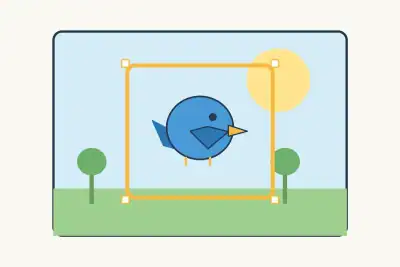
In the Editor 100 What does Scratch call the highlighted area where a game or cartoon plays?
200 What does Scratch call the selected bird, a separate character you can program?
300 Where do you drag…
400 What do we call…
500 You want to add…
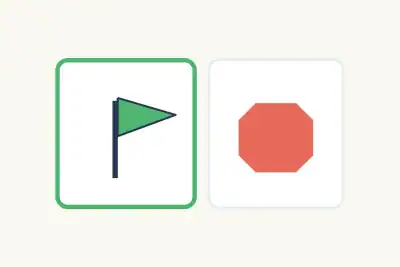
When It Runs 100 Which symbol in the picture do you click to start the game?
200 Which button ends all running actions?
300 What player action starts…
400 A hero should jump…
500 Two characters should act…
Make It Move 100 Which blue command makes a character take steps in the direction it faces?
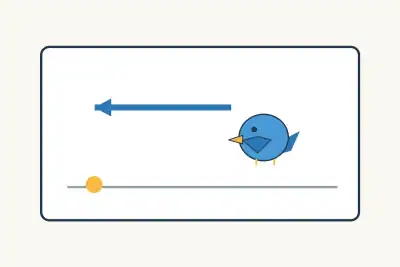
200 Which way will the bird go if it takes ten steps in the direction of its beak?
300 How many degrees did…
400 Which blue command carries…
500 A character faces up…
Bring It to Life 100 What action does the empty bubble beside the character show?
200 A bell recording is already in the project. Which command makes it audible?
300 A character should disappear…
400 The bird stays the…
500 The bird stays in…
Build the Logic 100 In a connected chain, which direction do commands run?
200 Which Control command runs an action a chosen number of times?
300 According to the diagram…
400 Which Control command keeps…
500 The program checks for…
Play this quiz All 25 questions and the answers are in the game. Invite your class or friends with a link — guests need no account.
Play↗
How it works Pick a quiz and press “Play”. Send students or friends the link — they join from a phone or a computer. Choose questions on the board, buzz in first and collect points.