Home Quizzes School Middle school Grade 6 Loops and conditions in Scratch Grade 6 · Computing
Computing quiz for grade 6: Loops and conditions in Scratch This quiz helps revise “Loops and conditions in Scratch” in Computing for grade 6. It has 25 questions in five categories: Repetition, What will it do?, Scratch, Algorithms, People and languages. Questions get harder as the points go up, from 100 to 500.
Play↗
A peek at the questions The 100- and 200-point questions are open here. The rest show only their first words, and there are no answers: all of that is in the game itself.
Repetition 100 What do we call a structure that runs the same commands several times over?
200 How many times do the commands inside a "repeat 5" block run?
300 What are the commands…
400 What do we call…
500 What is one run…
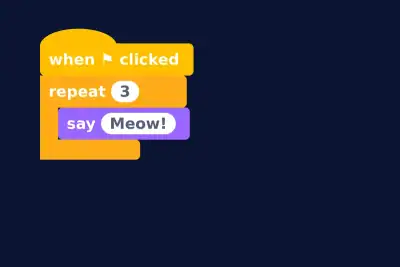
What will it do? 100 How many times will the sprite say "Meow!"?
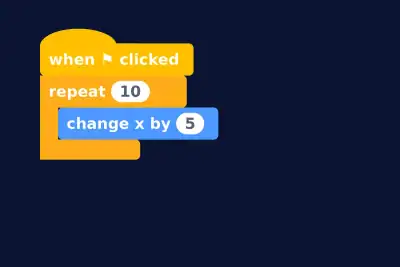
200 By how much will the sprite's x change after this script?
300 The sprite leaves a…
400 And what shape will…
500 How many times will…
Scratch 100 What are the characters and objects you program in Scratch called?
200 What is the area where the sprites move about in Scratch called?
300 Which Scratch block repeats…
400 What are the different…
500 Which American…
Algorithms 100 What is an exact sequence of steps that solves a problem called?
200 What kind of algorithm just runs its commands one after another, with no conditions or repeats?
300 What kind of algorithm…
400 What kind of algorithm…
500 What is finding and…
People and languages 100 Which popular programming language shares its name with a large snake?
200 What do programmers call a mistake in a program, as if it were an insect?
300 Which English mathematician, the…
400 In which programming language…
500 Whose team found a…
Play this quiz All 25 questions and the answers are in the game. Invite your class or friends with a link — guests need no account.
Play↗
How it works Pick a quiz and press “Play”. Send students or friends the link — they join from a phone or a computer. Choose questions on the board, buzz in first and collect points.